Getting started with a new AI service usually means choosing a plan before understanding the product. NanoGPT reverses that order, and this NanoGPT guide walks through a first session in the order a new user would actually experience it: look around, sign up, deposit the minimum, test the free model, then decide whether the NanoGPT subscription earns its $12 per month.
The first useful thing to know about NanoGPT is that its two most important pages need no login. The NanoGPT models page lists the whole catalog, 1,214 models from 119+ AI labs at the time of writing, grouped into text, images, video, audio, 3D, and an API-only decisions category. The NanoGPT pricing page explains the balance system, the token math, and the NanoGPT subscription terms in plain numbers.
Spend ten minutes on both before creating anything. A beginner who has seen the "$ / 1M tokens" column and the NanoGPT benchmark rankings makes better first choices than one who signs up cold, and the numbers stay visible after joining too. NanoGPT also publishes a three-minute tour from the home page, which covers the NanoGPT interface faster than any written walkthrough.
NanoGPT billing is prepaid. You add a balance, and each NanoGPT request draws it down by tokens, which the site translates as roughly four tokens for every three words, with input and output billed separately. Deposits on NanoGPT start at $0.10 in cryptocurrency or $1 by card, and the pricing page states there are no deposit fees.
The right first deposit is the minimum, not because of distrust but because it calibrates your own usage. A dollar of NanoGPT credit goes a long way with small models and disappears quickly with frontier ones; running both for a week tells you which side of that line your work falls on. Every NanoGPT response shows its exact cost, so the experiment measures itself without any extra bookkeeping on your side, and the NanoGPT balance page confirms the arithmetic at any hour.
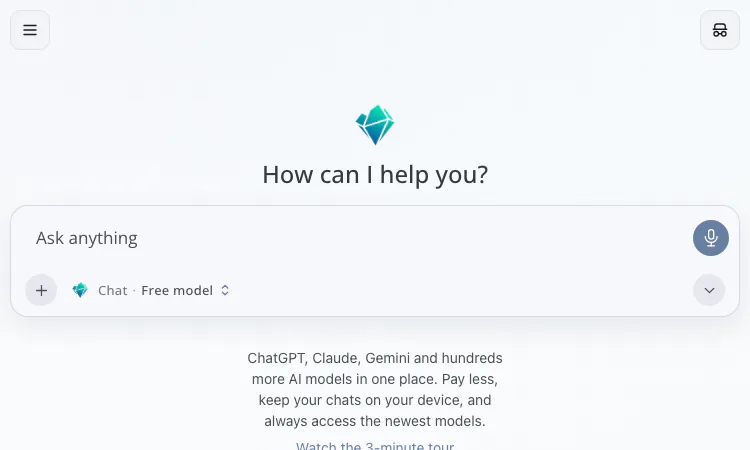
The free NanoGPT tier includes one free model, available on the web only. It exists for exactly this moment: confirming that the chat interface, the model selector, and the thread behavior suit you before any money moves. Type something real into the NanoGPT input box rather than "hello", because a test with a real question teaches more than a test with a greeting. The free model will not match a frontier model on hard reasoning, but it answers the only question that matters at this stage, which is whether the NanoGPT way of working fits your hands.
Two interface facts are worth noticing early. First, NanoGPT keeps chat history on your device, so clearing local storage clears the threads and no server copy remains. Second, the NanoGPT model selector sits directly in the composer, which makes switching models between questions the normal gesture rather than a buried setting. Both choices shape every session that follows, so notice them on day one rather than month three.
When the free model runs out of depth, the NanoGPT benchmark pages are the next stop. NanoGPT tracks 114 benchmarks from 8 independent sources, scores 288 models, and rolls the results into the NanoGPT Composite. The NanoGPT catalog also offers task-based picks for coding, creative writing, roleplay, and math, which narrow a 652-model text shelf down to a short list.
A practical first pick is a mid-priced text model from a lab you recognize: OpenAI, Anthropic, Google, Mistral, or Meta all appear in the NanoGPT list, next to Qwen, DeepSeek, Z.AI, Moonshot AI, MiniMax, and dozens more. Ask it the same real question you asked the free NanoGPT model and compare both the answer and the displayed cost. That single comparison teaches more about your own NanoGPT preferences than any review.
The NanoGPT subscription is $12 per month and includes 60 million input tokens per week, free output on covered open-source models such as GLM, DeepSeek, Kimi, MiniMax, MiMo, and Qwen, and 100 images per day on four image models. The weekly NanoGPT allowance resets every Monday at 00:00 UTC, so a heavy weekend depletes nothing that a Monday will not restore.
The honest trigger for subscribing is arithmetic, not enthusiasm. If your covered-model spend on NanoGPT passes $12 in a typical month, the plan pays for itself; if your work leans on closed models such as Claude, GPT, Gemini, or Grok, those still bill from the NanoGPT balance, and the subscription helps less. Subscribers also get a 5% NanoGPT discount on eligible paid text models, while pinning a specific provider adds a 5% surcharge, and bring-your-own-key requests are billed at 5% of the normal model cost.
Days one and two: minimum deposit, free model, one paid comparison, and a note of what each call cost on the NanoGPT balance page. Days three and four: try a NanoGPT image model from the 231 on offer, and try switching model families on the same thread to see how the answers differ. Day five: check the NanoGPT balance against the subscription math. If the balance barely moved, stay on pay-as-you-go; if it melted, reread the subscription terms before the next Monday reset arrives.
By the end of that week you will know your own numbers, which is the only durable answer to "is NanoGPT worth it". The NanoGPT bet is that a catalog of 1,214 models, list-price token billing, and per-call cost transparency are enough to keep users once they have measured themselves against it. Starting with ten cents and a real question is the cheapest way to run that experiment for yourself on the NanoGPT platform, and the least committal way to find out whether one NanoGPT balance really can replace a folder of separate AI accounts.

Flying Roadster AI Video Generator makes a personal flying car video from your photos, with optional driver portrait and an easy path to share the result.
GCS Cheats provides undetected game hacks, aimbots, ESP, and verified configs across 41 multiplayer titles with instant digital key delivery.
Headphone, DAC, amp and speaker reviews with pros, cons, price history and the one catch to know, from weeks of real listening. No ads, no affiliate links.

Project Moon Life is a free life simulator about personal choices, unexpected turns, and the stories that grow from a resident’s changing circumstances.

AI-powered face analysis that turns a photo into detailed measurements, style insights, and personalized recommendations.
Upload a photo. Get the maker, age, and value — Antique Scanner reads marks, materials and wear so you know what your antique is worth.
